Our School Vision
"This is the day that the Lord has made, let us rejoice and be glad in it." Psalm 118
Our Curriculum Vision
Intent
Here at Finchampstead, we are preparing the children for a world where they need to not only be safe, competent users of technology, but also digitally literate so that they are able to express themselves and develop their ideas through information and computer technology, both at a level suitable for the future workplace and as active participants in a digital world. With technology playing such a significant role in society today, we believe ‘Computational thinking’ is a skill children must be taught if they are to be able to participate effectively and safely in this digital world. A high-quality computing education equips pupils to use creativity to understand and change the world. Finchampstead children learn about technology through a wide range of physical and virtual resources including developing programming skills through coding using programs such as Scratch, photo and video editing and green screen technologies and are introduced to a range of technology, including desktops, iPads, the BBC Micro:Bit, and interactive whiteboards, allowing them to practise and improve the skills they learn. Throughout the wider curriculum, ICT is used across the school, where the computer suite and iPads enhance pupils’ learning, the latter allowing the children to take technology outside the classroom. Online safety is a key element of our PSHE curriculum too.
By ‘growing’ them through computing, we want children who:
- Are responsible, competent, confident and creative users of information and communication technology.
- Know how to keep themselves safe whilst using technology and on the internet and be able to minimise risk to themselves and others.
- Become responsible, respectful and competent users of data, information and communication technology.
- Can evaluate and apply information technology, including new or unfamiliar technologies, analytically to solve problems.
- Can analyse problems in computational terms, and have repeated practical experience writing computer programs in order to solve such problems.
- Can understand and apply the fundamental principles and concepts of computer science, including abstraction, logic, algorithms and data representation.
- Become digitally literate and are active participants in a digital world.
- Are equipped with the capability to use technology throughout their lives.
- Understand the importance of governance and legislation regarding how information is used, stored, created, retrieved, shared and manipulated.
- Are resilient when engaging with technology .
- Understand the online safety messages that can keep them safe online.
Implementation
The subject is broken down into three strands that make up the computing curriculum: Computer Science, Information Technology and Digital Literacy.
- Computer Science underlines the knowledge and skills relating to programming, coding, algorithms and computational thinking.
- Information Technology includes the knowledge and skills relating to communication, multimedia and data representation and handling.
- Digital Literacy is an understanding of the knowledge and skills relating to online safety and uses for technology.
We follow the Purple Mash scheme of work from Year 1-6 (with KS2 combining elements from the Switched on Computing scheme) ensuring consistency and progression throughout the school. Computing units are taught on a two tear year rolling programme. This ensures progression between year groups and coverage of a broad range of computing components such as coding, spreadsheets, Internet and Email, databases, communication networks, touch typing, animation and online safety. Where possible, Computing is linked to class topics but can be taught as discrete units and lessons where needed to ensure coverage. Due to half form year groups in our school, Teachers may plan to suit their children’s interests, current events, their own teaching style, the use of any support staff and the resources available.
Impact
Our Computing curriculum is planned to demonstrate progression and build on and embed current skills. We focus on progression of knowledge and skills in the different computational components and measure the impact of our curriculum using the following methods:
- An ongoing assessment against the planned Computing outcomes
- Children can understand and apply the fundamental principles and concepts of computer science, including abstraction, logic, algorithms and data representation
- Children can analyse problems in computational terms, and have repeated practical experience of writing computer programs in order to solve such problems
- Children can evaluate and apply information technology, including new or unfamiliar technologies, analytically to solve problems
- Children are safe, responsible, competent, confident and creative users of information and communication technology
- Pupil discussions about their learning
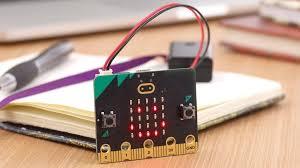
During the Spring Term we are running a Code Club during lunch break, once a week. We use scratch blocks to create individual avatars and animate a scene and we also introduce the BBC Mirro:bit.

-
Code Club We follow the Raspberry Pi coding using Scratch blocks
Dec 2024: KS2 Hour of Code to celebrate Computer Science Week. With the use of AI to create their backgrounds Goldfinch and Chaffinch proved themselves to be skilled coders and had great fun creating their own music videos.
October 2024: We used flow chart algorithms to plan the code needed to create volcanic eruption animations on the BBC Micro:bit.
June 2024: Emma from Three came to teach us all about Internet safety, running informative and fun workshops across the whole school.
BBC Micro:bits - Goldfinch were asked to design a device which could track a howler monkey through the layers of a tropical rainforest using a light sensor. We have some budding coders and inventors in the class!
Coding
Goldfinch have started to learn how to use functions within their programming. They were able to use code blocks to create a function which told their 'artist' how to draw a square and to change the pen colour.
June 2023- BUPA Coding Day. Years 1-4 used unplugged activities to develop their understanding of algorithms and healthy eating.


Goldfinch created their own rainforest adventures using 2Code, 2Connect and 2Create on Purple Mash.
Pupil Voice 2025 UKS2
What have you enjoyed most in your computer lessons?
Y6 Making my own jungle maze!
Y5 Making a game.
Why did you enjoy this topic?
Y6 Because I fully completed a game with different levels.
Y5 Because I could make my game unique.
Compared to last year, what can you do now that you couldn't do then?
Y6 We learnt how to use word and I know how to copy/cut and paste now.
Y5 I knew how to do the basics on Word but now I can add page borders, hyperlinks and drop caps.
Y5 If I could do it again I'd add more pictures to the letter I wrote.
How confident are you in computing? And how do you know you're achieving the targets for each topic?
Y6 I'm working above average! I know because I was allowed to help others in the class
Y5 I'm very confident as I could tick all of the success criteria my teacher gave me.
What are your targets for future learning?
Y5 Using PowerPoint.
Y6 To code a full game.
How will you be able to meet these targets?
Y6 I'll be creative and make it fun. I'll know what to do because I'll listen to my teacher.
Y5 Sometimes we can help each other too.
2022-2023
Does your teacher use an interactive whiteboard/display?
Rosefinch:
Yes, because it helps me understand.
Bullfinch:
Yes, it gives examples of what to do.
Chaffinch:
Yes, it's very good for focusing.
It's clear and better to understand.
We can all work together.
Goldfinch:
It helps me to know what I'm doing and shows me how to do it successfully.
Do you enjoy computing lessons?
Rosefinch:
Yes, I like playing games.
Bullfinch:
Yes!!! Quizzes.
Chaffinch:
I enjoy it because I like Purple Mash.
Yes because you can always be creative.
I love it!
Goldfinch:
Yes, I enjoy the lessons and my favourite was making games. Yes, the one when we were doing the spreadsheet and putting in the numbers and finding the answers efficiently.
Do you feel safe when you're using technology at school?
Rosefinch:
Yes, because I do all the right things and listen to all the rules.
Chaffinch:
I feel safe because my teacher supports.
I feel like it's my safe place.
I never share my password.
Goldfinch:
Yes, because there are teachers all around me and i know what to do it something bad happens.
Yes, because we have a firewall.
What have you done in computing so far?
Rosefinch:
Colouring on the computer.
Chaffinch:
It was fun doing animation.
I like online safety, because I want to be safe.
My favourite is game creation because you get to make your own game.
Goldfinch:
I found it really interesting learning about SMART.
We designed an art gallery, made a game and worked on spreadsheets.
What would you like to do next?
Bullfinch:
I want to do games next.
Chaffinch:
I want to do more schoolwork on the computer.
I wish I could do more animation.
Goldfinch:
I would like to program my own little game.
I would like to make my own app.